Most teams today are “adding AI” to products the way you add a chat widget: a box in the corner, a slash command, a magic button. It demos well, but it rarely changes how the product actually works.
Agent-native AI is the opposite approach. Instead of bolting on a chatbot, you design your product so AI agents are first-class participants in the system: they have roles, memory, tools, constraints, and long-term relationships with users.
This guide explains what agent-native AI really is, how it differs from generic “AI features,” and how to design and ship agent-based systems that feel reliable, human-centered, and genuinely useful. We’ll walk through concepts, architecture, and concrete design patterns you can apply immediately.
If you’re already thinking about whether your current architecture can support agent-native behavior, treat this guide as the conceptual map that checklist plugs into.
What is agent-native AI?
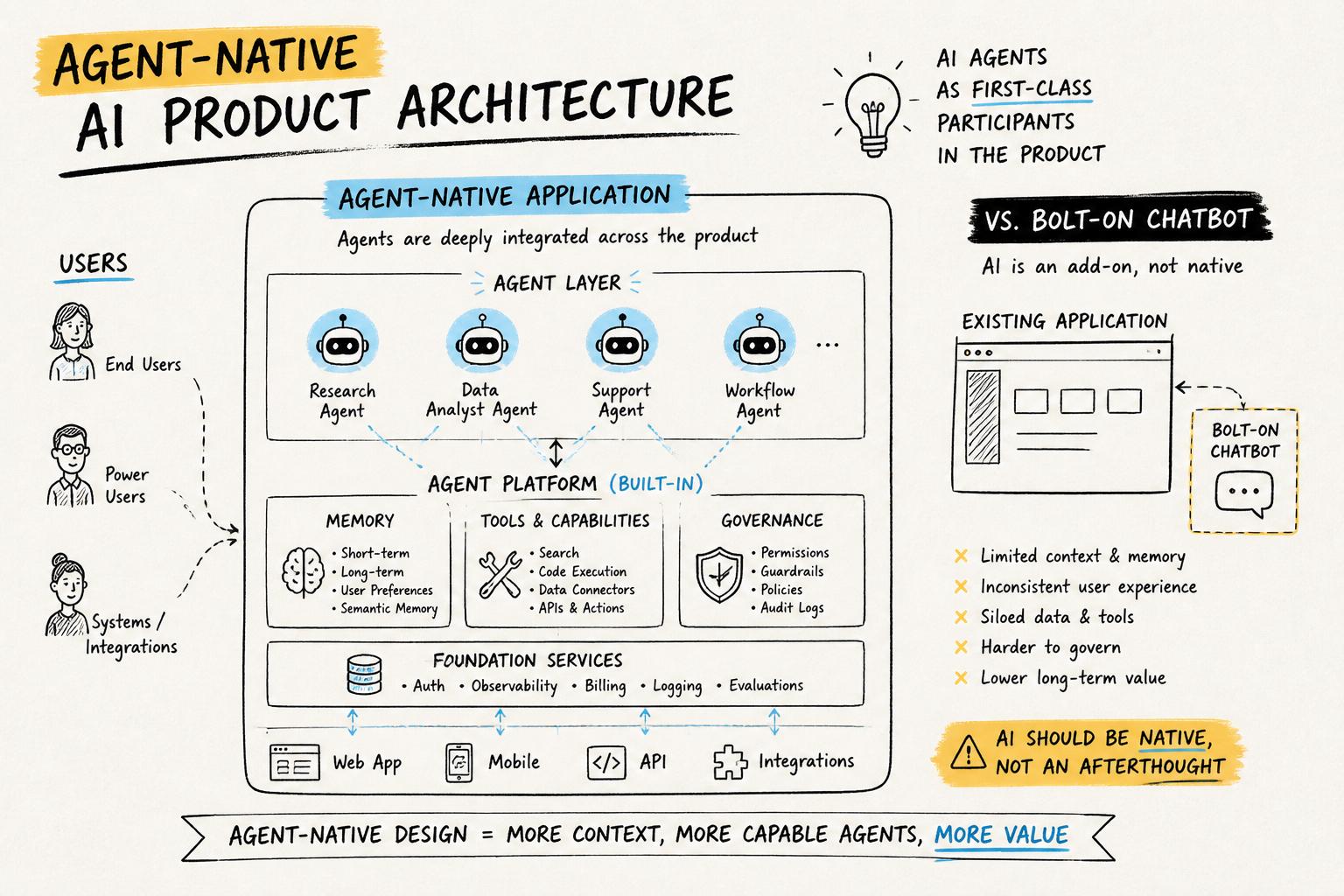
Agent-native AI is a way of building software where autonomous or semi-autonomous agents are part of the product’s core model, not an afterthought.
In an agent-native product:
Agents have clear roles and standing in the system (e.g., “research assistant,” “ops coordinator,” “studio producer”).
They can perceive the state of the product, decide what to do, and act through tools or APIs.
They maintain memory across sessions and build a history with each user or team.
They operate under governance rules that define what they can and cannot do, and when humans must be in the loop.
They are visible in the UI as participants, not just invisible automation.
This is closer to building an agent-based system than a single “AI feature.” You’re designing an ecology of humans and agents that share work over time.
Agent-native vs “AI-enabled” products
Many products today are AI-enabled: they use models for autocomplete, recommendations, or a chatbot. That’s useful, but the product’s core logic is still human-only.
An agent-native product makes a different bet: it assumes agents will be ongoing collaborators. That affects everything from data modeling to UX to pricing.
Concrete differences:
AI-enabled: “We added a GPT-powered chat sidebar.”
Agent-native: “This product ships with a default ‘project steward’ agent that tracks your goals, nudges you, coordinates tasks, and explains what it’s doing.”
As we’ll see, designing that steward requires memory, character, and standing, not just a prompt.
Why agent-native AI matters now
Three shifts make agent-native AI more than a buzzword:
Models are good enough at language and code to orchestrate complex workflows.
Tooling and APIs make it feasible for agents to act (e.g., run code, call services, update data).
User expectations are rising: people want AI that remembers, adapts, and collaborates—not just responds.
Research on multi-agent simulations and generative agents shows that even relatively simple agents with memory can exhibit surprisingly rich behavior. For product teams, the question is how to harness that power safely and usefully.
Business benefits of agent-native products
When done well, agent-native design can unlock:
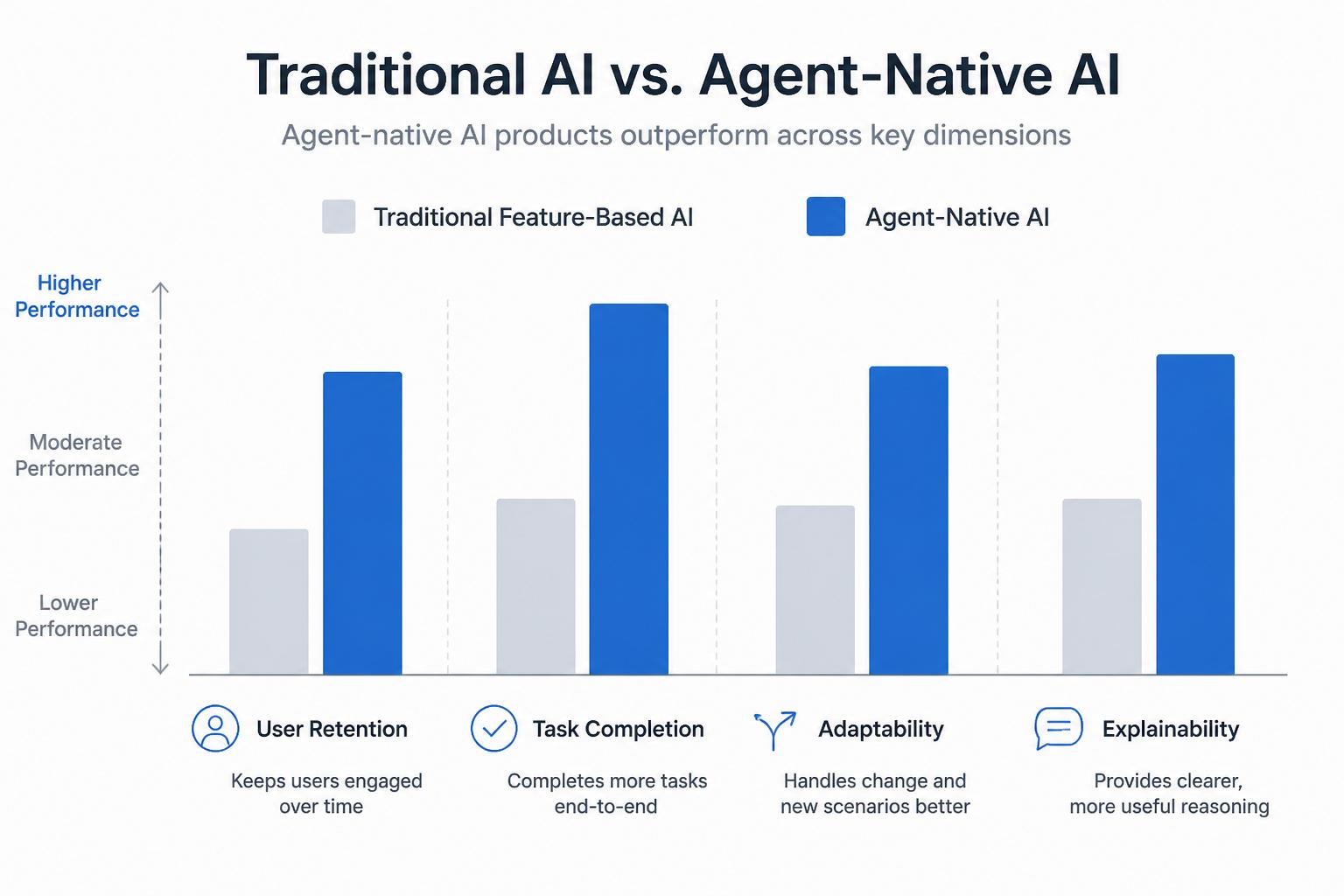
Higher retention: users build relationships with persistent agents that “know them.”
Deeper product embedding: agents integrate with more of the user’s workflow, not just a single screen.
Better differentiation: competitors can copy a feature, but not an ecosystem of agents, memory, and governance.
New business models: pricing around “seats + agents,” or vertical agents specialized for industries or roles.
Core principles of agent-native AI
Before diving into architecture, it helps to define a few principles that distinguish agent-native AI from “just add GPT.”
1. Agents have standing, not just skills
An agent-native product treats agents as participants with roles, not just function calls. That means:
They are named and visible (e.g., “Mara, your research lead”).
They have scope: what they are responsible for and what they ignore.
They have authority boundaries: what they can do autonomously vs what needs approval.
This is closely related to designing agents with memory, character, and standing, where the user knows who they’re talking to and what to expect.
2. Memory is a first-class design problem
Stateless chat is easy to build and easy to abandon. Agent-native products treat memory as core infrastructure:
Short-term memory for ongoing tasks or sessions.
Long-term memory of user preferences, history, and projects.
Shared memory across agents so they can coordinate.
Design questions include what to remember, how to surface it back to the user, and how to let users edit or erase it for control and privacy.
3. Governance is built-in, not bolted on
Agents that can act need guardrails. Agent-native AI bakes in governance, observability, and escalation paths from day one, not as a compliance afterthought.
For example, in an operations product, an agent might be allowed to draft changes to a schedule but not publish them without human review above a certain impact threshold. Our AI agent governance template offers a reusable way to specify these rules.
4. Humans stay at the center
Agent-native does not mean “fully autonomous.” The most durable systems are symbiotic: humans and agents each do what they’re best at.
Principles of human-centered AI agents apply strongly here: make it clear what the agent is doing, why, and how the human can override or steer it.
How agent-native AI changes product design
For product teams, adopting agent-native AI isn’t just an architecture choice. It reshapes core product questions: who is the user, what is the job-to-be-done, and what does “done” look like?
From features to relationships
Traditional product thinking focuses on features and flows. Agent-native thinking focuses on relationships and rhythms:
How does the agent show up in the user’s day or week?
What promises does it make and keep?
How does the relationship deepen over time as memory accumulates?
For example, in a consumer creative tool, an agent might evolve from “suggesting edits” to “co-developing a style” with the user as it learns their tastes.
From workflows to delegations
Instead of designing only for “what the user clicks,” you design for what the user delegates:
What tasks are safe to fully delegate?
Where is “draft then review” the right pattern?
Where must the human stay fully in control?
This mirrors patterns in human delegation inside teams: clear expectations, checkpoints, and feedback loops.
From static UI to conversational and agentful UI
Agent-native products rarely rely on chat alone. Instead, they mix:
Structured UI for clarity and control (forms, timelines, boards).
Conversational surfaces for flexible intent capture.
Agent presence: avatars, activity feeds, explanations of what agents are doing.
The goal is not to anthropomorphize but to make the system’s behavior legible.
Agent-native architecture: the essential layers
Once you commit to agent-native AI, you’ll find your architecture naturally organizes into a few layers.
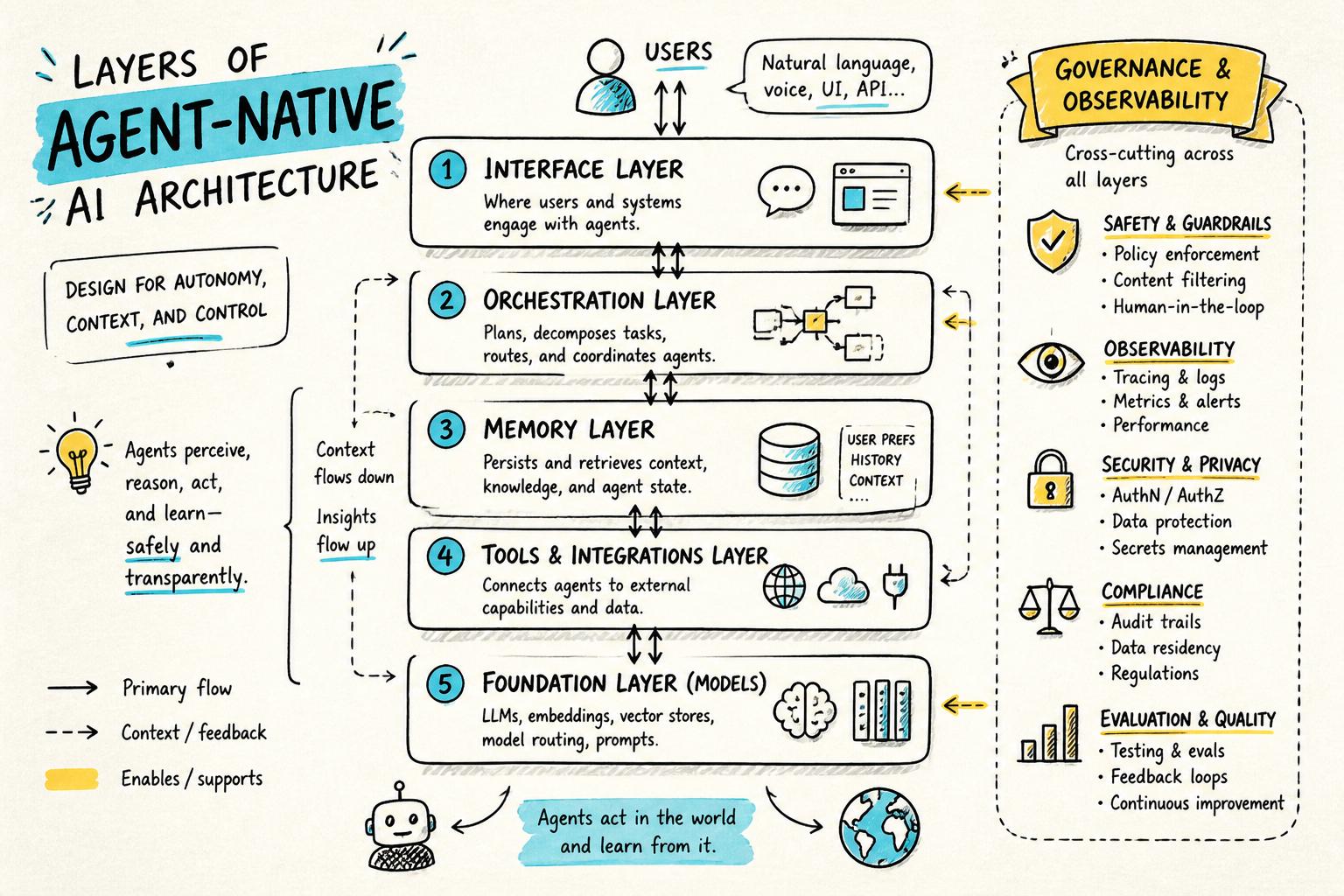
1. Interface layer
This is how humans and agents interact:
Chat interfaces and messaging surfaces.
Task views, dashboards, and timelines showing agent actions.
Controls for approvals, constraints, and feedback.
Design this layer so that agent actions are inspectable and reversible. Users should see what happened, why, and how to undo it.
2. Orchestration and agent logic
Here you define what agents are, how they plan, and how they coordinate. This often includes:
Agent definitions: roles, capabilities, and tools.
Planning and decomposition: breaking goals into steps.
Multi-agent coordination: handoffs, negotiation, or specialization.
At this layer, you decide whether you’re building a single powerful agent, a small team of specialized agents, or a broader ecosystem. Research into agents in open-ended environments can inspire patterns here, but product constraints should lead.
3. Memory layer
Your memory layer stores:
User-level memory: preferences, history, long-term projects.
Agent-level memory: past decisions, rationales, and internal notes.
Shared context: documents, events, and state the agents can access.
In practice, this often combines relational databases, vector search, and logs. The key is to design schemas around questions agents will need to answer, not just raw storage.
Agents become truly useful when they can act through tools:
Internal APIs (e.g., create task, update record, send notification).
External services (e.g., calendars, CRMs, cloud storage).
Code execution sandboxes for custom logic.
Each tool should have typed inputs/outputs, clear error semantics, and safety constraints. Many teams adopt a “capabilities registry” so agents can discover and call tools in a controlled way.
5. Governance, safety, and observability
This “wraps around” all other layers:
Policy engines to decide when actions require approval.
Audit logs of prompts, decisions, and tool calls.
Monitoring for drift, failures, and unusual behavior.
Our governance template for AI agents is designed to plug directly into this layer, so teams can specify rules in human language and translate them into system behavior.
Designing agents: roles, memory, and character
Architecture is necessary but not sufficient. The difference between a forgettable agent and a trusted collaborator is in the design details.
Clarify the agent’s job-to-be-done
Start with a sharp, human-readable statement of the agent’s job:
“Help a solo founder keep their customer interviews organized and turned into product decisions.”
“Act as a producer for a podcaster: prep guests, suggest questions, and assemble show notes.”
“Coordinate a household’s logistics: schedules, reminders, and recurring tasks.”
Everything else—tools, memory, UI—should trace back to this job.
Give the agent a coherent character
Character is not about cutesy personas; it’s about consistent behavior under uncertainty. A well-designed character helps users predict how the agent will respond.
Define:
Voice and tone: formal vs casual, concise vs exploratory.
Attitude to risk: cautious, opinionated, or experimental.
Default strategies: ask for clarification vs make a best guess.
Our guide on designing agents with memory, character, and standing goes deeper into these patterns.
Design memory as a UX surface
Memory should be visible and editable, not a black box. Patterns that work well include:
A “What I know about you” panel users can inspect and correct.
Inline explanations: “I suggested this because you preferred X last time.”
Session timelines showing how the agent’s understanding evolved.
This aligns with emerging best practices in explainable and controllable AI interfaces, where transparency improves trust and outcomes.
Governance: what agents can and cannot do
As soon as agents can take real actions, governance stops being optional. You need clear answers to:
What the agent is allowed to do autonomously.
What requires human review or multi-step confirmation.
What is forbidden, regardless of user requests.
Define rules in human language first
Before encoding anything in code or prompts, write a simple policy document that covers:
Scope: domains and data the agent can touch.
Actions: CRUD operations, messaging, financial moves, etc.
Escalation: when to ask the user, when to ask another human, when to refuse.
This is exactly the purpose of an AI agent governance template: make the rules legible to product, legal, and engineering teams.
Translate rules into system behavior
Then, map those rules into:
Tool-level permissions and rate limits.
Prompt-level instructions and examples.
Runtime checks before executing high-risk actions.
Over time, you’ll likely iterate on this as you observe real user behavior and edge cases.
Roadmapping agent-native AI into your product
Moving from “AI feature” to “agent-native product” is not an overnight switch. It’s a roadmap.
Stage 1: Assistive features inside existing flows
Start by adding assistive, non-destructive capabilities where AI can help but not break things:
Drafting content or summaries.
Suggesting next steps or templates.
Highlighting anomalies or opportunities.
At this stage, you’re learning about user expectations and where delegation feels natural.
Stage 2: Persistent agents for specific jobs
Next, introduce one or two named agents with clear jobs and memory:
This is where you begin to see the value of memory, character, and governance. Our guide on roadmapping AI agents into your product walks through this evolution in more detail.
Stage 3: Multi-agent ecosystems and workflows
Finally, you can explore multi-agent systems where specialized agents collaborate:
A research agent, a planning agent, and an execution agent working together.
Domain-specific agents (e.g., legal, finance, design) that share memory.
At this stage, your architecture and governance must be solid; otherwise complexity will outpace reliability.
Human-centered agent-native AI
Agent-native does not mean user-optional. The most successful systems keep humans at the center of decision-making and meaning-making.
Make agent behavior legible
Users should never feel like “the AI did something behind my back.” Design for:
Activity feeds that log what agents did and why.
Inline explanations for surprising suggestions or actions.
Undo and rollback for agent-initiated changes.
This matches broader human-computer interaction research showing that transparency and control increase trust in AI systems.
Design for consent and boundaries
Agent-native AI can easily overstep if you don’t design boundaries:
Ask permission before accessing new data sources.
Let users set “zones” where agents cannot act without explicit consent.
Offer granular toggles for automation vs suggestions.
These patterns are core to building human-centered AI agents that feel like partners, not surveillance.
Practical checklist: are you building agent-native AI?
Use this quick checklist to assess whether your product is truly agent-native or just AI-flavored.
How Point Eight AI thinks about agent-native products
At Point Eight AI, we build agent-native AI products for consumers and teams, with a focus on long-term relationships between humans and agents rather than short-lived demos.
That shows up in a few concrete ways:
Our agents have memory, character, and standing from day one, not as a v2 feature.
We invest heavily in transparent rules for what agents can and cannot do, and how they escalate to humans.
We design for human–AI symbiosis: agents that augment creative, cultural, and craft-based work instead of replacing it.
We share our thinking openly through initiatives like our governance templates and principles for human-centered agents.
If you’re a product team, developer, or early adopter exploring agent-native AI, we care about the same questions you do: what does it mean to give agents real power, and how do we do it carefully?
Next steps
To go deeper from here:
Evaluate whether your current stack can support agents using our agent-native architecture checklist.
Design your first production-ready agent using the patterns in designing AI agents with memory, character, and standing.
Define safe boundaries for your agents with the AI agent governance template.
Ground your UX decisions in the principles from human-centered AI agents.
Agent-native AI is not just a technical trend; it’s a shift in how we imagine software: from static tools to living systems of humans and agents working together. The teams who learn to build these systems carefully, transparently, and human-centrically will define the next decade of AI products.